Create impressive photo mosaics from your own photo collection with Photo Mosaic Maker, specialized software developed by EzMosaic.
A photo mosaic is an image constructed from hundreds or thousands of smaller photographs. Each small photograph acts as an individual tile, replacing a section of the main image with a picture that matches its color and visual characteristics.
From a distance, the individual photographs blend together to recreate the main image. Up close, the mosaic reveals the many personal photographs that make up the composition.
Photo Mosaic Maker is designed to make this process accessible while providing advanced controls for users who want greater flexibility and precision.
Developed by EzMosaic, a mosaic software specialist since 1998, Photo Mosaic Maker combines image-processing technology, photo-matching algorithms and flexible mosaic construction methods.
Want to explore the latest version? Visit PhotoMosaicMaker.com for current product information, software editions, pricing and downloads.
How Does Photo Mosaic Maker Work?
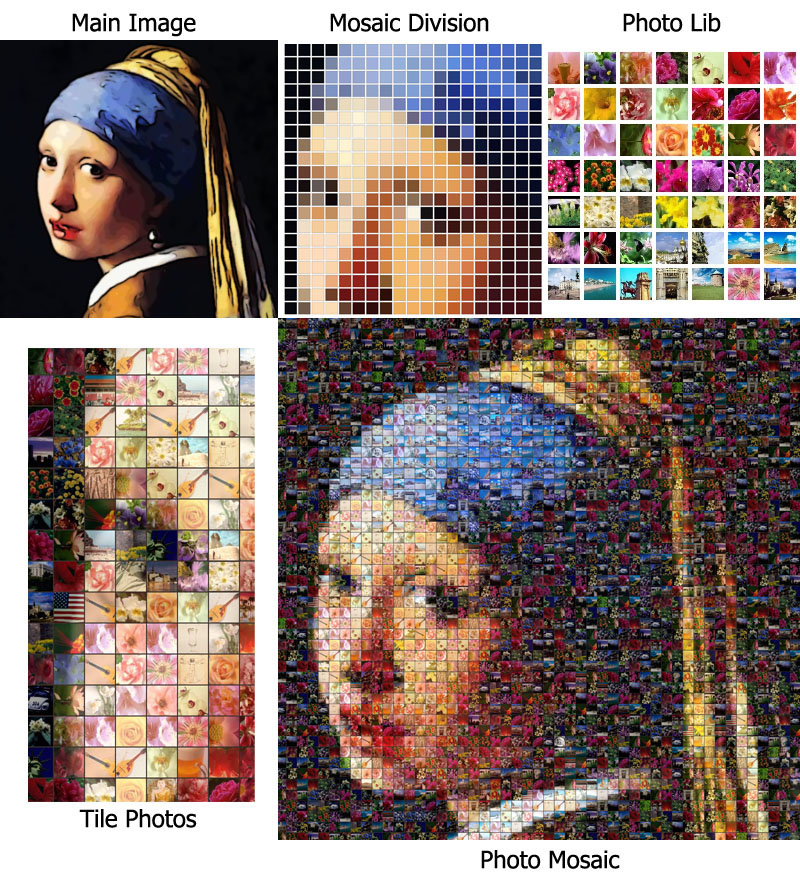
Creating a photo mosaic involves two main image collections:
- Main image: The photograph or artwork you want the finished mosaic to reproduce.
- Tile photo collection: The individual photographs used to construct the mosaic.
The software divides the main image into smaller cells and analyzes the visual characteristics of each region. It then selects photographs from your collection to fill those cells.
The challenge is to find suitable photographs while maintaining a convincing overall image. Good results depend on the matching process, cell size, photo repetition, image patterns and other rendering settings.
Photo Mosaic Maker provides tools to control these elements and refine the finished composition.
Key Features of Photo Mosaic Maker
Create Mosaics from Your Own Photo Library
Use your personal collection of photographs as the building blocks of the mosaic.
You can import a collection of pictures and let the software use them as individual mosaic tiles. This makes it possible to create highly personal artwork from family photographs, travel pictures, customer images, event photographs or other image collections.
Multiple Cell Shapes
A photo mosaic does not have to use only square or rectangular cells.
Photo Mosaic Maker supports five cell shapes, including ellipse and hexagon options. Different shapes can create different visual effects and give the finished mosaic a distinctive appearance.
Multiple Pattern Styles
The arrangement of individual cells influences the texture and visual character of a mosaic.
Available pattern styles include:
- Normal pattern
- Cross pattern
- Concentric circles pattern in the PRO edition
These options provide different ways to arrange photographs and create visual effects.
Advanced Rendering Controls
Photo Mosaic Maker includes several rendering controls to help users refine the final result.
Important controls include:
- Photo repetition: Manage how frequently individual photographs are used.
- Cell size range: Control the range of cell sizes used in the mosaic.
- Gap color: Adjust the color appearing between individual cells.
- Color matching: Refine how photographs are selected to reproduce the main image.
- Other rendering settings: Fine-tune the appearance of the finished composition.
These controls are useful when working with different photo collections, image styles and output requirements.
Flexible Photo Mosaic Construction
Different projects require different levels of detail.
A portrait, a landscape, a corporate logo and a large promotional mosaic may all need different cell arrangements and rendering settings.
Photo Mosaic Maker provides flexibility to adjust the mosaic construction process to suit the image and the desired result.
Screenshots


Photo Mosaic Maker Editions
The original EzMosaic product information describes two desktop editions: Standard and PRO.
The editions differ in their supported photo library size, maximum mosaic cell count and available pattern options.
| Feature | X9 Standard | X9 PRO |
|---|---|---|
| Maximum photo library | 2,000 images | 10,000 images |
| Maximum cell count | 10,000 | 40,000 |
| Cell shapes | 5 | 5 |
| Normal pattern | Yes | Yes |
| Cross pattern | Yes | Yes |
| Concentric circles | No | Yes |
These are the specifications published in the previous EzMosaic product description. Please check the current edition comparison on the product website before purchasing, as product specifications may change.
For current software versions, pricing and availability, visit PhotoMosaicMaker.com.
How to Create Your Own Photo Mosaic
The basic photo mosaic workflow is straightforward.
Step 1: Choose Your Main Image
Select the photograph or image you want to reproduce.
Images with clear subjects, recognizable shapes and good contrast are often easier to turn into effective photo mosaics.
The main image determines the overall appearance of the finished artwork.
For a poster-size mosaic containing approximately 2,400–3,600 cells, a relatively small main image can sometimes be sufficient. The appropriate resolution depends on the image, cell arrangement and desired level of detail.
Step 2: Prepare Your Photo Collection
Collect the photographs that will become the individual mosaic tiles.
The number of photographs needed depends on the size of the mosaic, the desired variety and the repetition settings.
As a general starting point:
- Around 200 photographs may be sufficient for a basic project.
- Around 1,000 photographs can provide greater variety.
- Larger collections can provide additional choices, subject to the capabilities of the software edition and your computer.
The photographs do not all need to have the same dimensions. The software can use your image collection to construct the mosaic.
Step 3: Configure Your Mosaic
Select your main image and photo collection.
Then choose the cell shape, pattern and desired mosaic dimensions.
You can crop the main image and preview how it will be divided into individual cells.
Step 4: Adjust Rendering Options
Experiment with repetition, color matching, cell size range and gap color.
These settings influence how closely the mosaic resembles the main image and how the individual photographs appear.
Step 5: Render and Review
Start the rendering process and review the completed mosaic.
You may adjust the settings and render again to improve the result.
Step 6: Save, Print or Share
Once the mosaic is ready, save the finished artwork for printing, presentation or sharing.
For additional printing and project assistance, see Mosaic Production, Printing & Shipping.
What Can You Create with Photo Mosaic Maker?
Family and Personal Photo Mosaics
Transform family photographs, travel pictures, wedding memories and other personal collections into a single piece of artwork.
A photo mosaic can make a meaningful gift or a distinctive way to display personal memories.
Corporate and Promotional Mosaics
Organizations can use customer photographs, employee pictures, event images and campaign submissions to create large composite artworks.
A photo mosaic can become a promotional display, commemorative image or centerpiece for a special event.
Large-Scale Photo Mosaic Projects
Large photo mosaics require more than image matching. They may involve processing extensive photo collections, preparing high-resolution files, planning print layouts and organizing physical assembly.
EzMosaic has experience supporting large-scale photo mosaic projects.
One notable example was a 2008 Procter & Gamble Guinness World Records project.
Procter & Gamble collected photographs from its customers. EzMosaic processed and prepared 180,000 source photographs, produced the digital preview, prepared print-ready sheets and created the assembly workplan.
The completed mosaic measured 660.525 square meters and contained 105,196 photographs.
This project illustrates the importance of reliable image processing and careful production preparation when a photo mosaic is created on a very large scale.
More Than Software: Professional Photo Mosaic Design Services
Photo Mosaic Maker is intended for users who want to create their own mosaics. However, some projects require additional expertise or production support.
You may have a large photo collection, a specific image to reproduce, a demanding output size or a project that needs professional preparation.
EzMosaic also provides professional photo mosaic design services.
Depending on the project, assistance can include:
- Reviewing the main image and source-photo collection.
- Planning the mosaic layout and visual approach.
- Processing and matching large photo collections.
- Preparing digital mosaic artwork.
- Preparing high-resolution and print-ready files.
- Creating production materials and assembly workplans.
Learn more about Professional Photo Mosaic Design Services.
For printing and project delivery options, visit Mosaic Production, Printing & Shipping.
Why Choose EzMosaic?
EzMosaic focuses on mosaic software development and related technology.
Our experience combines software engineering, image processing and practical project work.
Mosaic software development since 1998
We have dedicated years to developing software for different mosaic techniques and creative applications.
Specialized image-matching technology
Photo Mosaic Maker uses image-analysis and matching methods to help construct mosaics from large photo collections.
Flexible construction methods
Different cell shapes, patterns and rendering controls provide flexibility for different images and project requirements.
Experience beyond software
Our experience includes preparing photo mosaics for large-scale projects, where image processing, print preparation and assembly planning are essential.
Software and professional services
Users can create mosaics independently or work with EzMosaic for professional design and production assistance.
Frequently Asked Questions
What is a photo mosaic?
A photo mosaic is a large image constructed from many smaller photographs. Each photograph acts as a tile, and the collection of tiles recreates the appearance of the main image.
How many photographs do I need?
The required number depends on the mosaic dimensions, cell count and repetition settings. A collection of around 200 photographs may be a useful starting point, while larger collections can provide greater variety.
Can I use my own photographs?
Yes. Photo Mosaic Maker is designed to use your own photo collection as the individual mosaic tiles.
What cell shapes are available?
The original X9 product description lists five cell shapes, including ellipse and hexagon. The available patterns and options depend on the software edition.
What is the difference between Standard and PRO?
The original edition comparison lists different maximum photo library sizes, cell counts and pattern options. Visit the product website for the latest edition comparison.
Can I print my photo mosaic?
Yes. The completed mosaic can be saved as digital artwork for printing. For projects requiring large-format output or additional preparation, EzMosaic can also discuss production assistance.
See Mosaic Production, Printing & Shipping.
Can EzMosaic create a photo mosaic for me?
Yes. If you prefer professional assistance rather than using the software yourself, visit our Photo Mosaic Design Services page.
Where can I download Photo Mosaic Maker?
Visit the independent product website for current downloads, versions, system requirements and purchasing information.
Explore Photo Mosaic Maker
Whether you want to create a personal photo mosaic or develop a more ambitious project, EzMosaic provides software and professional support to help you get started.
Visit PhotoMosaicMaker.com to explore the software.
Need professional assistance? Explore Photo Mosaic Design Services.