Photo Mosaic Design Software
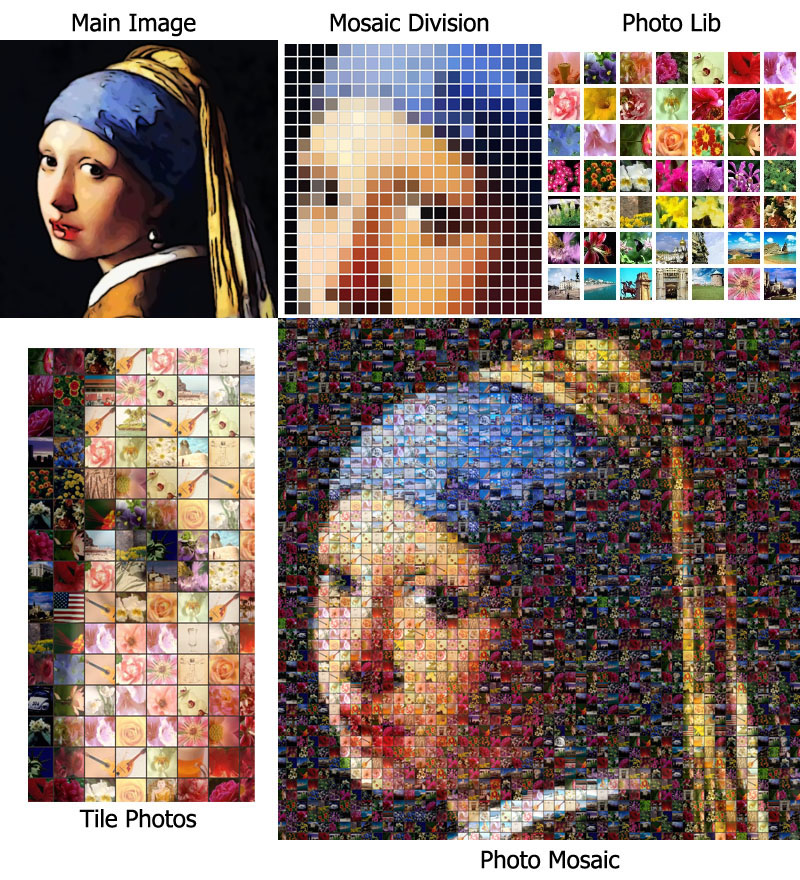
A photo mosaic is an image that has been divided into a grid of smaller sections, each replaced by a photograph that matches the color and tone of the original region. When viewed from a distance, these individual tiles blend together to form the main image — but up close, the composition reveals itself as hundreds or even thousands of tiny pictures, known as tile photos.
Photo Mosaic Maker is designed for users who want to create high-quality photomosaics with ease and precision.
Key Features:
- Create photo mosaics using your own image library
- Support for various cell shapes
- Multiple pattern styles to choose from
- Advanced render controls: repetition, cell size range, gap color, color matching, and more
Screenshots


Edition Comparison
| Photo Mosaic Maker X9 Standard | Photo Mosaic Maker X9 PRO |
| Photo Library – Supports up to 2,000 images for rich, varied mosaics Cell Count – Create mosaics with up to 10,000 individual cells Cell Shapes – Choose from 5 cell shapes, including Ellipse, Hexagon, and others Pattern Options – Normal and cross patterns for different visual effects | Photo Library – Supports up to 10,000 images for rich, varied mosaics Cell Count – Create mosaics with up to 40,000 individual cells Cell Shapes – Choose from 5 cell shapes, including Ellipse, Hexagon, and others Pattern Options – Normal, cross and Concentric Circles patterns for different visual effects |
Download Free Trial
| Platform | Download Link |
| Windows | https://www.ezmosaic.com/download/beta2023/PhotoMosaicMakerTrialWin64.zip |
| Mac OSX M1 – M4 | |
| Mac OSX old |
Purchase Photo Mosaic Maker
| Edition | Price | Order Page |
| Photo Mosaic Maker X9 Standard | $24.95 | |
| Photo Mosaic Maker X9 PRO | $99.95 |
Purchase from Microsoft Store
https://www.microsoft.com/store/apps/9MZBD16ZF14R
Purchase from Apple Store
💡 When you purchase directly from us, we will provide both Windows and Mac versions.
Quick Guide: How to Create Your Own Photo Mosaic
Step 1. Choose a Main Image
The main image should have simple details — think bold shapes and clear contrast. When viewed from a distance, it will emerge as the final mosaic.
For a poster‑size mosaic (about 2400–3600 tiles), your main image can be as small as 80×120 pixels (each tile roughly represents 2×2 pixels). A 100×100 pixel image is usually enough for a face or a simple object, and can work for a half‑body portrait.
Step 2. Gather Your Photo Collection
You’ll need a library of photos to become the tiny tiles inside the mosaic.
- Minimum for good quality: ~200 photos
- Excellent quality: ~1000 photos
- More than 2000 can also work well, but may slow down processing.
Step 3. Create Your Mosaic with Photo Mosaic Maker
- Select your main image.
- Choose a cell shape and pattern, then set the desired mosaic size.
- Load your personal photo collection for the small cells.
- Crop the main image and preview how it will be divided.
- Adjust render options (repeat, color match, gap color, etc.) and start the rendering.
- Done! Print your mosaic or share it online.